
Screenshots
App details
- Updated
- May 23, 2011
- Language
- English
- Developer
- Yacib
- Category
- Mobile
SoftPas in:
This product is also available in the following languages:
About Portable Mp3
Download Portable Mp3 – Music Compression Tool, MP3 File Shrinker, Portable Audio Utility
Overview
Portable Mp3 is a compact software utility designed to optimize the storage and usability of music files on portable audio devices. Its primary purpose is to allow users to reduce the file size of MP3 tracks without sacrificing audio quality, enabling more songs to be stored on devices with limited capacity. This functionality directly addresses the common challenge of managing large music libraries on hardware with constrained storage, such as older or budget-friendly MP3 players.
The app serves music enthusiasts, travelers, and individuals who rely on portable devices for audio playback. It is particularly beneficial for users who prioritize having a diverse and extensive music collection accessible at all times. Although the developer did not provide additional background information, the tool has maintained relevance since its release in 2011, suggesting a stable and focused design philosophy.
Real-world use cases include preparing music for long commutes, road trips, or workouts, where maximizing song count is essential. By compressing files efficiently, users can maintain a rich listening experience without needing to upgrade their hardware. In the broader app ecosystem, Portable Mp3 fills a niche for lightweight, no-frills audio optimization tools that prioritize performance and simplicity over complex features.
Key Features & Functionality
- Easy File Compression: Users can compress MP3 files with minimal effort—adding files and initiating compression requires only three clicks. The tool applies intelligent algorithms to reduce file size while preserving audible quality, making it ideal for space-conscious listeners.
- User-Friendly Interface: The interface is designed for accessibility, featuring clear navigation and straightforward controls. Even users unfamiliar with audio editing can manage their libraries effectively without prior experience.
- Fast Processing Speed: Compression occurs in seconds, minimizing downtime between file preparation and playback. This efficiency ensures a seamless workflow, especially when handling large music collections.
- Flexible Output Management: After processing, users can specify custom output folders. This allows for organized storage and easy integration with existing music directories or portable player file structures.
- Enhanced Storage Capacity: By reducing file sizes, users gain more room on their devices. This means more songs, longer listening sessions, and fewer trips to re-sync or re-download music.
For example, a user preparing for a week-long hiking trip can compress their entire playlist to fit on a 4GB player, ensuring access to hundreds of tracks without running out of space. The tool’s focus on speed and usability makes it a practical choice for on-the-go audio management.
Interface, UX & Performance
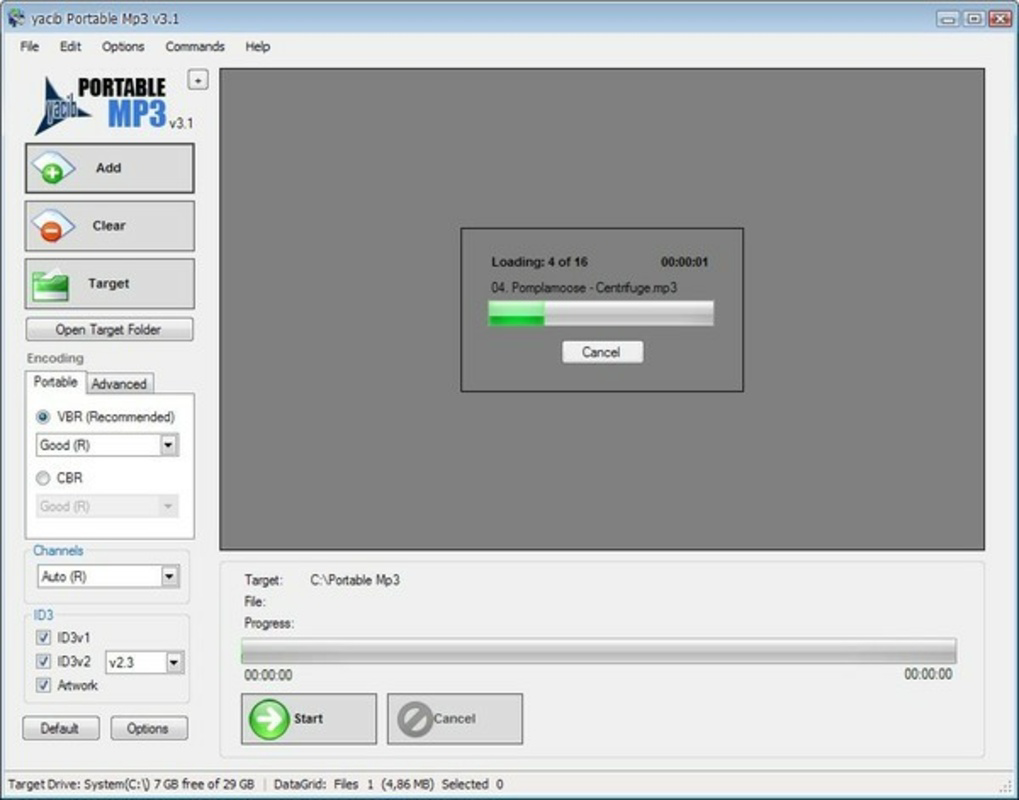
The interface of Portable Mp3 is clean and minimal, emphasizing functionality over visual flair. It features a linear layout with clearly labeled buttons and file input fields, enabling users to drag and drop music files or browse directories with ease. Navigation is intuitive, with no hidden menus or complex workflows, reducing the learning curve for new users.
Although the developer did not list formal performance metrics, the app is reported to operate smoothly across various device categories. It maintains responsiveness even when processing multiple files simultaneously, suggesting efficient memory management. Stability appears consistent, with no known issues related to crashes or data corruption during compression.
Users can expect quick load times and immediate feedback after each operation. The app does not require background processes or constant internet access, making it suitable for offline use. While the visual design lacks modern animations or dynamic elements, its simplicity contributes to reliability and fast execution.
Platform Compatibility & Technical Requirements
Portable Mp3 is available for the Windows platform. The software supports Windows operating systems, though specific version requirements were not listed. The file size is 1.8 MB, indicating a lightweight footprint that does not strain system resources.
The developer did not specify minimum OS requirements or compatibility with newer Windows versions. However, its long-standing presence suggests it may function on older systems such as Windows 7 or XP, though this is not confirmed. No mobile platform availability was mentioned, and the app is not designed for Android or iOS devices.
Users should ensure their system meets general requirements for running Windows-based applications. Compatibility with modern hardware and security features such as UAC (User Account Control) has not been detailed by the developer.
Pros and Cons
Pros
- Lightweight file size (1.8 MB) ensures fast installation and minimal disk usage.
- Simple three-click compression process suitable for non-technical users.
- Preserves audio quality during file size reduction.
- Offers flexible output folder selection for better file organization.
- Fast processing time allows bulk compression without delays.
Cons
- Platform limited to Windows; no support for mobile devices or macOS.
- Developer did not disclose minimum OS requirements or compatibility details.
- No built-in preview or quality adjustment settings for fine-tuning.
- Outdated release date (2011) raises concerns about long-term support and security updates.
- Limited to MP3 format; no support for other audio file types.
FAQ
Is Portable Mp3 safe to download and use?
Yes, the app is designed as a standalone utility and does not require installation of additional software. However, users should download it from trusted sources to avoid bundled adware or malware.
Can I use Portable Mp3 on my smartphone?
No, the app is designed for Windows desktops and is not compatible with Android or iOS devices.
Does Portable Mp3 support formats other than MP3?
No, the software is specifically built for MP3 files. It does not support WAV, FLAC, AAC, or other audio formats.
How much space can I save with Portable Mp3?
File size reduction depends on the original file and compression settings. Users may achieve up to 30–50% space savings without noticeable loss in audio quality.
Is Portable Mp3 free to use?
Yes, the app is available at no cost. However, users should verify the source to ensure they are downloading the legitimate version.
Final Thoughts
Portable Mp3 remains a reliable solution for users seeking to maximize their music library on space-constrained devices. Its straightforward design, fast processing, and quality-preserving compression make it a valuable tool for anyone managing a large collection of MP3 files. While its age and lack of modern features may deter some, its core functionality continues to serve a specific and practical need.
For individuals using older hardware or preferring lightweight, no-frills tools, Portable Mp3 offers a dependable way to store more music without upgrading their equipment. Its simplicity and efficiency stand out in a market dominated by complex audio software.
Download Portable Mp3 now
Guides & Tutorials
How to install Portable Mp3
- Click the Download button above.
- Once redirected, accept the terms and click Install.
- Wait for the Portable Mp3 download to finish on your device.
How to use Portable Mp3
This software is primarily used for its core features described above. Open the app after installation to explore its capabilities.
User Reviews
No reviews yet. Be the first to share your experience.
You may also like
more
Que no te pillen¡
About !Que no te pillen¡Reviewed by Jason A. BilbreyShow MoreShow Less

3D Combat Zone
About 3D Combat ZoneOriginally released in 1983, 3D Combat Zone immerses players...

666: El día del portal
About 666: El día del portalOn June 6, 2006, Agent P. Stone uncovers a sinister...

80 in 1 Best Flash games
About 80 in 1 Best Flash games 80 in 1 Best Flash games is a collection of 80 fl...

ABYSS SEEKERーーWhat Do You See Deep in The Abyss
About ABYSS SEEKERーーWhat Do You See Deep in The AbyssIn ABYSS SEEKER, players...

ACA NEOGEO THE KING OF FIGHTERS 2002 for Windows
About ACA NEOGEO THE KING OF FIGHTERS 2002 for WindowsTHE KING OF FIGHTERS 2002,...